Chrome extension for Facebook Ad Library research
AdSpector
Save, organize, and analyze Facebook advertisements without turning every research session into scattered tabs and screenshots.
Save, organize, and analyze Facebook advertisements without turning every research session into scattered tabs and screenshots.

Real extension screenshot
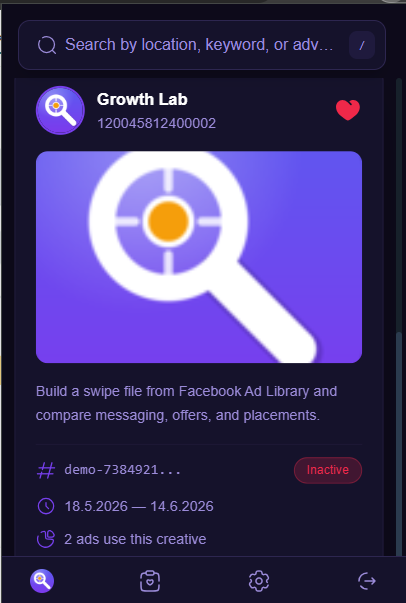
500
saved ad limit
MV3
Chrome ready
Local
saved library
Search
Query and filter Facebook Ad Library results by market, status, platform, and media type.
Save
Store ad copy, page identity, dates, CTA text, and creative references together.
Analyze
Review saved examples in one compact popup instead of rebuilding context from tabs.
Chrome Web Store
The site is ready for privacy and support submission links now. The install call-to-action can be swapped to the store listing once it is live.
Bento workspace
Query Facebook Ad Library from the popup, filter by active status, country, category, media type, and publisher platforms.
Keep ad IDs, page names, creative copy, media references, dates, and CTA metadata together for later comparison.
Detect Facebook Ad Library links on pages and surface fast access badges when useful.
Jump from a saved card back to Facebook's ad detail page with the source ad ID.
Preview page identity, image or video creative, body copy, active state, start date, end date, and collation count in one compact card.
Local caching and saved-ad storage keep common research sessions fast, while the popup stays focused on the decisions that matter.
Workflow
AdSpector is designed for marketers, media buyers, and founders who need a cleaner way to collect examples from Facebook Ad Library.
Filter ad library results by market, placement, status, and creative format.
Add the ads worth revisiting to a searchable extension library.
Compare angles, offers, copy, and creative patterns before building campaigns.